
A free, unlimited Granola alternative that runs on your computer
By the Toolbay team · Updated
Cerealis free, unlimited and open source (MIT), and it runs on your computer. Like Granola, it takes meeting notes without a bot joining your call. Unlike Granola, there is no paid plan and no limit: Granola's free plan keeps 30 days of meeting history and unlimited history costs $14 per user per month, while Cereal keeps every meeting on your own disk for free. Recording, transcription, speaker separation and the AI notes all happen on your PC, with no account.
Windows is ready. The Mac build is an early beta.
Cereal vs Granola at a glance
Granola's details below are from its own pricing and security pages.
| Feature | Cereal | Granola |
|---|---|---|
| Price | Free, no paid tier | Basic $0; Business $14; Enterprise $35 |
| Meetings and history | Unlimited, on your disk | Basic: 30 days of history; Business: unlimited |
| Works offline | Yes, once installed | Not stated; transcription runs on cloud providers |
| Bot joins the call | No | No |
| Transcription | On your computer (whisper.cpp) | Cloud providers “like Deepgram and Assembly” |
| AI that writes the notes | On your computer (an open Qwen model via llama.cpp) | Providers “like OpenAI and Anthropic” |
| Where notes are stored | Your app data folder | Granola’s US-hosted AWS cloud |
| Meeting audio | Kept on your computer; never uploaded | Not stored after transcription |
| Account | Not needed | Yes |
| Apps | Windows (ready), Mac (beta) | Mac and Windows, iOS, Android, Apple Watch |
Granola pricing and limits (October 2026)
From granola.ai/pricing, per user per month. The page lists monthly prices only.
| Feature | Price | What the plan includes |
|---|---|---|
| Basic | $0 | Bot-free notes; meeting history limited to 30 days |
| Business | $14 | Unlimited meeting notes and history |
| Enterprise | $35 | Business plus workspace-wide admin and privacy controls |
| Cereal (for comparison) | $0 | Unlimited meetings and history, on your computer, no plan to pick |
Is there a free, unlimited version of Granola?
Not from Granola: its free Basic plan only keeps the last 30 days of meetings, and unlimited history starts with Business at $14 per user per month ($168 a year). Cereal has no plans at all. There is no meeting count, no history limit and no trial to run out, because nothing runs on our servers: the cost of transcribing and writing notes is your own computer's time.
Can you use Granola without a subscription?
Yes, on the free Basic plan, as long as 30 days of history is enough. If you want to keep every meeting without paying, a local app is the way to do it: Cereal stores audio, transcripts and notes in your own app data folder, so they stay as long as you keep them.
Granola alternative for Windows
Granola itself runs on Windows (its native Windows app shipped in June 2025, per Granola's blog), so you don't need an alternative just to get Windows support. The reasons to pick Cereal on Windows are price, privacy and limits: it is free and unlimited, and the speech, speaker and notes engines all run on your PC. Cereal's Windows version is the most tested; the Mac build is an early beta.
Open-source Granola alternatives compared
Cereal isn't the only open-source option, and it's the youngest. The two best-known projects, from their GitHub pages:
| Feature | Cereal | Meetily | Anarlog (formerly Hyprnote) |
|---|---|---|---|
| License | MIT | MIT | MIT |
| Runs locally | Yes: whisper.cpp, speaker separation, local Qwen notes | Yes: Parakeet/Whisper, diarization, Ollama summaries | Local-first; local models supported |
| GitHub stars | New (October 2026) | About 32,000 | About 9,500 |
| Code | sriptcollector/cereal | Zackriya-Solutions/meetily | fastrepl/anarlog |
What Cereal adds: a one-click install through the Toolbay app with the speech, speaker and notes engines included (no separate model server to set up), a Granola-style notepad where your own points stay and the AI fills in the rest, and a free Toolbay account only if you want your settings synced.
How it takes notes without a bot
Cereal records two tracks: your microphone (“You”) and your computer's sound (everyone else). Because it listens to your computer rather than joining the meeting, it works the same in Zoom, Google Meet, Microsoft Teams, Slack huddles, Discord, Webex or a phone app, and nobody sees a notetaker appear in the participant list.
When a call starts, a small popup asks Take notes?and nothing records until you click. You type rough notes during the meeting while a live transcript fills in. When the call ends, Cereal re-transcribes the whole thing at full quality, separates the other speakers (Speaker 1, 2, and so on, which you can rename once), removes speaker echo if you didn't wear headphones, and turns your notes plus the transcript into clean notes with decisions and action items.
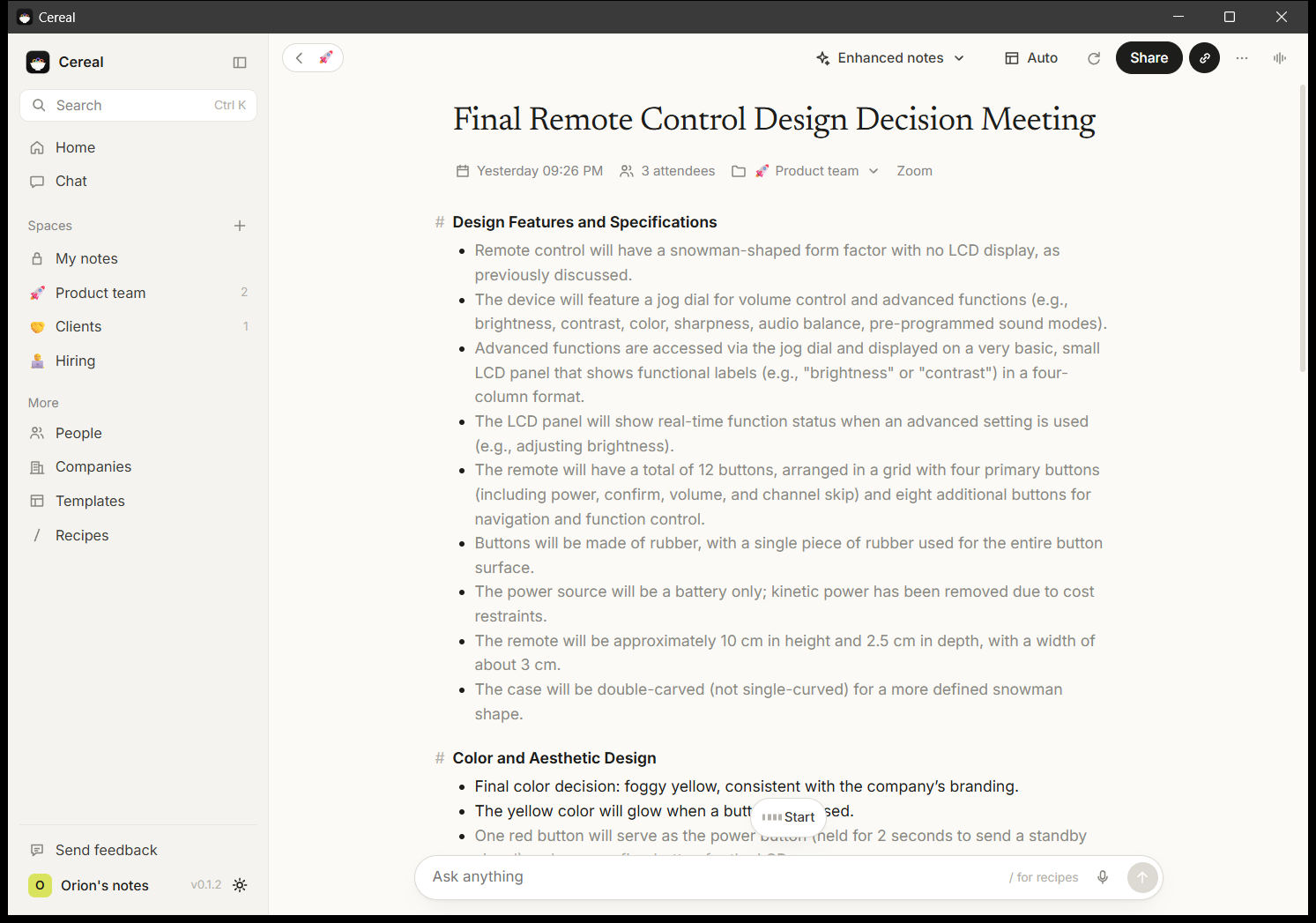
Recording other people has rules. Cereal reminds you each time it starts and gives you an editable message to paste in the meeting chat, because in many places everyone has to agree to be recorded.
How long do local notes take?
For a 44-minute meeting with four people, measured by the developer on one desktop PC:
Time from the end of the call to finished notes
What else it does
- Templates for 1:1s, sales calls, stand-ups, interviews, user interviews, kick-offs, pitches, lectures, and your own.
- Chat with one meeting or all of them, with recipes like action items by owner, a follow-up email, or “what did I miss?”.
- Full-text search across titles, notes and transcripts.
- Export notes or transcripts as Markdown or PDF.
- Optional cloud engines with your own API key, if your computer is too slow for local models.
What you give up by switching
- No phone or watch apps. Granola has iOS, Android and Apple Watch apps; Cereal is desktop only.
- No shared team workspace: your notes live on your computer. You share them by exporting.
- The Mac build is produced automatically and hasn't been tested on a real Mac yet.
- On a laptop without a graphics card, notes take minutes after a long call instead of seconds.
Who should switch, and who should stay
Switchif you're on Windows, want recordings and notes to stay on your computer, hit the 30-day history limit on Granola's free plan, or don't want to pay $168 a year for meeting notes.
Stay with Granola if you take notes on your phone, share notes across a team every day, or need a vendor with enterprise admin controls.
Dictating rather than meeting? Toolbay Flow is the free, local take on voice typing.
Related
- CerealScreenshots, reviews and how to get it
- Free Wispr Flow alternativeToolbay Flow vs Wispr Flow: free, unlimited, offline
- Offline speech to text on WindowsThree free ways to dictate without the internet
- How to voice type on a PCWin+H, Voice Access or a free hold-to-talk hotkey
- Vote on the next rebuildPick the paid app Toolbay rebuilds next
Granola is a trademark of Granola. Toolbay's tools are independent open-source projects, inspired by Granola, and are not affiliated with or endorsed by Granola.